Brother MFC-L8900CDW Business Color Laser All-in-One Printer Review
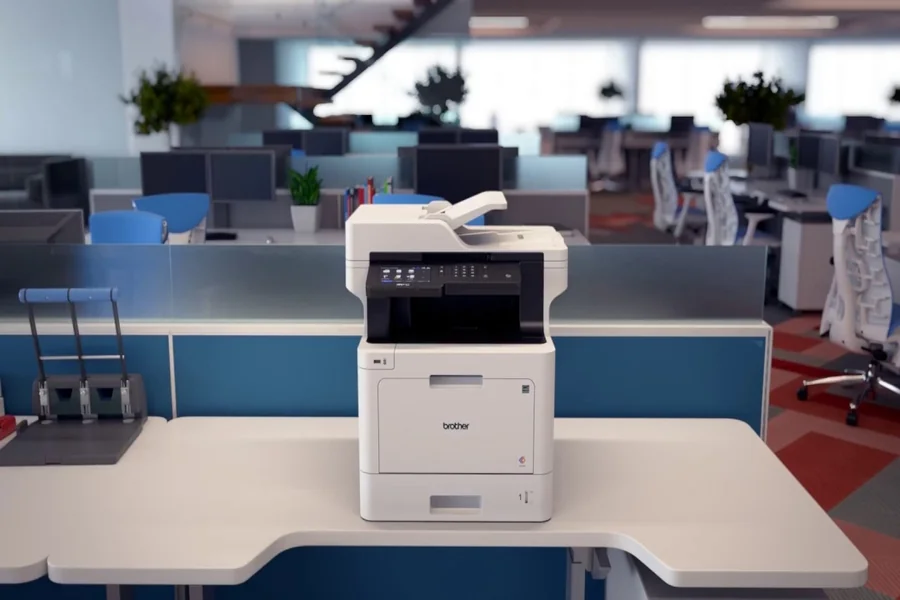
The Brother MFC-L8900CDW business color laser all-in-one printer is designed to meet the demands of modern offices that need reliable printing, scanning, copying, and faxing in one powerful machine. Businesses today rely heavily on efficient document management, and having a dependable multifunction printer can make daily tasks much easier. This particular model from Brother stands out because it combines fast performance, high-quality color output, and advanced connectivity options.
For small businesses, workgroups, and busy offices, choosing the right printer is important. The right device should be fast, cost-effective, and capable of handling large workloads without constant maintenance. The Brother MFC-L8900CDW fits into this category by offering professional-level features while still remaining relatively easy to use.
In this article, we will look at its design, printing capabilities, key features, connectivity options, performance, and why it has become a popular choice for many workplaces.
Overview of the Brother MFC-L8900CDW
The Brother MFC-L8900CDW is a multifunction color laser printer built for business productivity. It is designed to handle a wide range of office tasks including printing documents, scanning files, copying materials, and sending faxes. This combination of features eliminates the need for multiple devices, helping businesses save both space and money.
One of the most appealing aspects of this printer is its speed. It can print both color and black-and-white documents at up to 33 pages per minute, which makes it ideal for offices that regularly print reports, presentations, or marketing materials.
The device also includes a large touchscreen display that allows users to easily navigate menus, change settings, and access different functions. Even employees who are not particularly tech-savvy can quickly learn how to operate the machine.
Another important feature is the automatic duplex printing capability. This means the printer can automatically print on both sides of the paper, which helps reduce paper usage and lowers overall office costs.
Design and Build Quality
The design of the Brother MFC-L8900CDW focuses on practicality and durability. It has a solid structure that can handle heavy use in busy work environments. While it is not a small device, its size reflects the powerful functionality packed inside.
The printer includes a large 5-inch color touchscreen display that is located on the front panel. This screen is responsive and easy to read, allowing users to access various features with simple taps. The interface is designed to be intuitive so that employees can quickly perform tasks such as scanning to email or copying documents.
The automatic document feeder is another useful feature. It allows users to load multiple pages at once for scanning or copying, which saves time compared to manually placing each page on the scanner glass.
Paper capacity is also impressive. The standard tray can hold hundreds of sheets, and additional trays can be added for businesses that require even larger printing volumes. This flexibility makes the printer suitable for growing offices with increasing document needs.
Printing Performance and Speed
When it comes to performance, the Brother MFC-L8900CDW delivers strong results. Its printing speed of up to 33 pages per minute ensures that documents are produced quickly without long waiting times.
Color laser technology provides crisp text and vibrant images. This makes the printer suitable not only for everyday documents but also for marketing materials, charts, and presentations that require professional-looking color output.
Another benefit is the fast warm-up time. Many laser printers require a delay before the first page is printed, but this model is designed to start printing quickly once a job is sent.
Businesses that print large volumes will appreciate the high monthly duty cycle. This means the printer can handle significant workloads without experiencing performance issues. For busy offices where printing is a constant task, this reliability is extremely valuable.
Print Quality and Professional Results
Print quality is a key factor when selecting a business printer. The Brother MFC-L8900CDW produces sharp and consistent output thanks to its advanced color laser technology.
Text documents appear clear and easy to read, which is especially important for contracts, reports, and official correspondence. Color graphics also look vibrant and well-balanced, making presentations more visually appealing.
The printer supports a high print resolution, which ensures detailed output for images and diagrams. Even smaller text remains readable, which is useful when printing spreadsheets or technical documents.
Businesses that regularly print brochures or promotional materials will find that the printer delivers professional results without requiring outsourcing to external printing services.
Scanning, Copying, and Fax Features
In addition to printing, the Brother MFC-L8900CDW also provides powerful scanning, copying, and fax capabilities. These features help businesses manage documents more efficiently.
The scanning function allows users to send files directly to email, cloud storage services, or network folders. This makes it easier to digitize documents and store them securely. Many offices are transitioning to digital record keeping, and a reliable scanner plays an important role in that process.
Copying features include options for resizing documents, adjusting quality, and producing multiple copies quickly. This is particularly useful for meetings or training sessions where printed materials need to be distributed.
Fax functionality may not be used as frequently as it once was, but many industries still rely on it for official communication. Having fax capabilities built into the printer ensures that businesses remain compatible with traditional document exchange methods.
Connectivity and Mobile Printing
Modern offices often require flexible printing options, and the Brother MFC-L8900CDW provides several connectivity choices. The printer supports wireless networking, Ethernet connections, and USB connectivity.
Wireless support allows employees to print documents directly from laptops, tablets, or smartphones without needing to connect cables. This is especially convenient in offices where multiple users share the same printer.
Mobile printing options are also available through various applications and services. Employees can print files directly from their mobile devices, making it easier to work remotely or from different parts of the office.
Cloud integration is another helpful feature. Documents stored in online services can be printed directly without first downloading them to a computer.
Security Features for Business Use
Security is a growing concern for businesses, particularly when dealing with sensitive information. The Brother MFC-L8900CDW includes several built-in security features designed to protect documents and network access.
One example is secure print functionality. This allows users to send documents to the printer but requires a PIN code before the pages are actually printed. This prevents confidential documents from being left unattended in the output tray.
Network security protocols also help protect the printer from unauthorized access. Businesses can configure permissions to control who is allowed to use specific features.
User authentication options are available as well, allowing administrators to manage printer access across teams or departments.
Cost Efficiency and Maintenance
Operating costs are an important consideration for any office printer. The Brother MFC-L8900CDW is designed to keep expenses manageable through efficient toner usage and long-lasting components.
High-yield toner cartridges are available for this model, which means fewer replacements and lower cost per page. For offices that print frequently, this can lead to significant savings over time.
Automatic duplex printing also reduces paper consumption, which not only saves money but also supports environmentally friendly practices.
Maintenance is relatively simple. The printer is designed for easy access to toner cartridges and other components, allowing quick replacements when necessary.
Final Thought
The Brother MFC-L8900CDW is a powerful and versatile device that meets the needs of modern workplaces. With its combination of fast printing speeds, high-quality color output, and multifunction capabilities, it provides excellent value for businesses that rely on efficient document management.
From printing professional reports to scanning important files and supporting mobile connectivity, this printer offers the flexibility needed in today’s office environments. Its reliable performance and cost-effective operation make it a practical choice for small businesses, workgroups, and busy departments.
For organizations looking for a dependable multifunction printer that can handle demanding workloads while delivering consistent results, the Brother MFC-L8900CDW business color laser all-in-one printer stands as a strong option.
FAQs
What functions does the Brother MFC-L8900CDW provide?
The printer offers printing, scanning, copying, and faxing capabilities in a single multifunction device.
How fast can the printer produce documents?
The printer can print up to 33 pages per minute for both color and black-and-white documents.
Does the printer support wireless printing?
Yes, the printer supports wireless connectivity, allowing users to print from laptops, smartphones, and tablets.
Is automatic duplex printing available?
Yes, the printer includes automatic duplex printing, which allows documents to be printed on both sides of the paper.
Can the printer scan documents to email or cloud services?
Yes, it supports scanning directly to email, network folders, and various cloud storage platforms.